From MyBrandtrack you can generate ads with artificial intelligence. Below we show you how to do it:
1️⃣ Go to the main section and look for the button with the speaker icon.
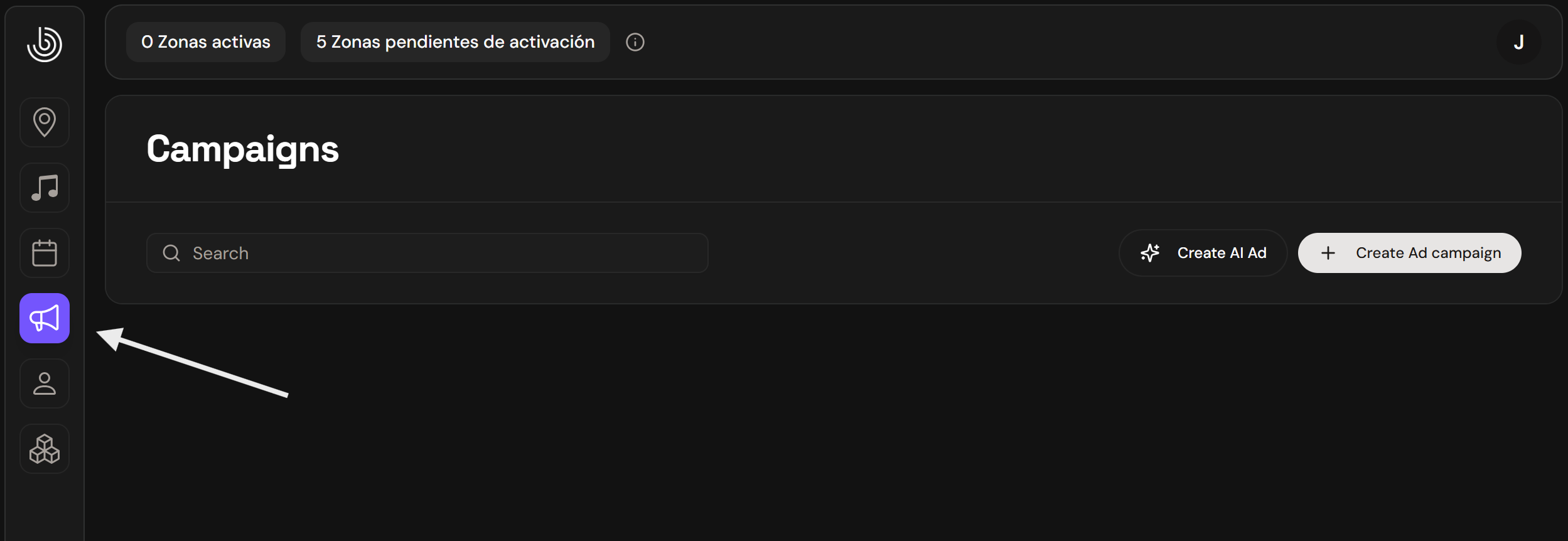
2️⃣ Once you enter "Campaings," press the create AI AD button
3️⃣ When you enter Create AI Ad, you will be able to generate your ad.
Fill out and configure the following fields:
📝 Ad text
Write the message you want the voiceover in your ad to say.
🔊 Sound settings
Select speaker language
Select the language in which the ad should be spoken.
Select voice
Choose the type of voice you prefer.
You can try different options until you find the one that best fits your brand or style.
Show speaker settings
Here you can adjust the expression, speed, intonation, and other voice parameters to personalize how the ad will sound.
🎵 Select background music style
Select the style of background music you want to include in your ad.
You can choose from different options or leave it without music if you prefer.
4️⃣ Generate and download the ad
Once you press “Generate Speech”, you will be able to listen to the AI-generated audio from the bottom bar.
If you like the result, select the “Download” button to download the file.
That's it! Your ad has been created.
